 Travis Horn
Add LocalStorage to your Vue app in 2 lines of code

Say you already have your Vue app up and running, but you want your users to be able to save their state between usage sessions. How can you achieve this? If using LocalStorage is an option, it is very easy!
A non-LocalStorage app
Say we have a simple “to do” app. It might look like this example.
The app template is made out of two basic components:
- an
<input>that’s bound tonewTodoand executesaddTodo()on enter. - a list that loops over
todos; displaying a checkbox bound totodo.completedand a text node bound totodo.text
The Vue app is defined with two data objects:
newTodo, which stores the value of the new “to do” text inputtodos, which is an array of existing todo items (currently empty)
The app has a single method:
addTodo(), which pushes a new “todo” object to thetodosarray and then clears thenewTodotext input
Near the bottom of the app, I’ve placed some code to be executed when the app is
mounted(). For now, it just logs the event to the console.
Finally, I’ve added a watcher on the todos array:
watch: {
  todos: {
    handler() { console.log('Todos changed!'); },
    deep: true,
  },
},
For now, the handler just logs the event to the console. Note the deep
property is set to true. This is important, as it directs Vue to look at all
nested properties inside the array.
Problem
As simple as it is, the app works just fine; You can add new “to do” items, and then toggle them completed or not.
But what happens when the user closes or refreshes the page? Everything is lost.
Solution
The simple solution is to use LocalStorage to save data on the client. Caniuse.com describes LocalStorage as…
A method of storing data locally like cookies, but for larger amounts of data.
The browser support is very nice. See the LocalStorage support table from caniuse.com
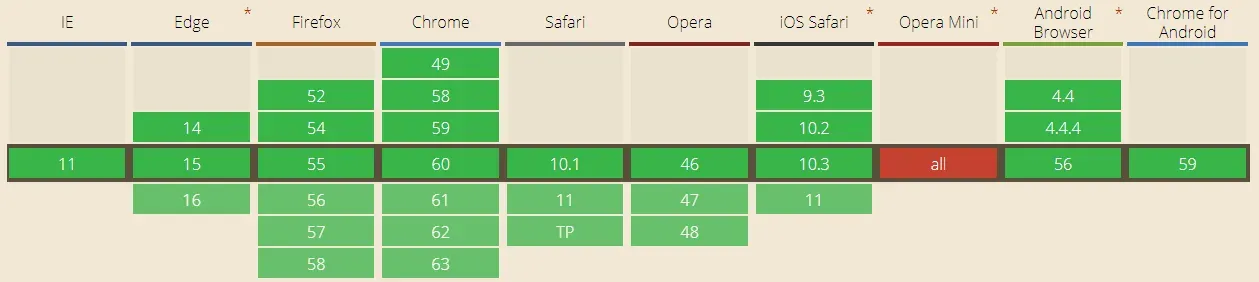
The basic idea here is to listen for two events:
- when the
todosarray changes, serialize it and save to LocalStorage - when the app mounts, get the data from from LocalStorage, deserialize it, and
update the
todosarray.
The first event will be handled with the watcher we already have in place. Just add one line:
watch: {
  todos: {
    handler() {
      console.log('Todos changed!');
      localStorage.setItem('todos', JSON.stringify(this.todos));
    },
    deep: true,
  },
},
With that line in place, when the app’s todos array is changed, LocalStorage’s
todos key is set to a stringified version of the array.
The second event will be handled with the mounted() lifecycle hook:
mounted() {
  console.log('App mounted!');
  if (localStorage.getItem('todos')) this.todos = JSON.parse(localStorage.getItem('todos'));
},
The line above first checks to see if there is a todos key in LocalStorage. If
so, it parses it and sets the app’s todos array.
That’s it! With those two lines, our app works as expected.
Here’s the live demo on CodePen.
If you open up your browser’s dev tools (F12) and go to the Application tab, you can see our key/value pair set in the Local Storage section.
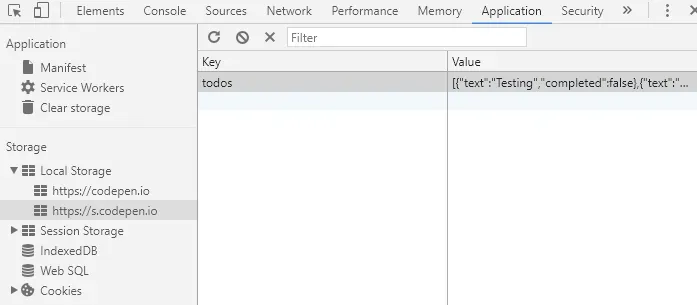
If you close & reopen or refresh the page, your “to do” items persist!