 Travis Horn
DuckDB Storage Showdown

We all know DuckDB is fast. It feels like magic when you’re working with millions of rows, even on a laptop. But we often treat data storage as an afterthought, dumping data into CSVs because they’re universal, or JSON because that’s what the API uses. I wanted to find out if I was leaving free performance on the table simply by saving my files in the wrong format.
So I took a standard dataset and ran it through DuckDB in multiple formats: CSV, JSON, and five different compression flavors of Parquet. I measured write speeds, file sizes, and query latency. The results were night and day.
The Contenders & The Arena
For the data, I used a student assessment dataset with about 50,000 rows and over 20 columns. It isn’t massive, but it’s real-world enough to be useful. It contains a mix of integers, floats, booleans, and strings ranging from unique IDs to repeated categorical values. This variety is key to seeing how different formats handle actual data types.
The lineup included the classic CSV and JSON up against Parquet in five different flavors: uncompressed, Snappy, Zstd, LZ4, and Brotli. The process was straightforward. I loaded the data, exported it to every format to measure write speeds and file sizes, and then hammered each file with five analytical queries to see which one read the fastest.
Round 1: File Size & Write Time
JSON was the heavyweight loser here, with a file size of nearly 28 MB due to its verbose syntax. CSV fared better at roughly 10 MB, but Parquet was the clear winner. Even without any compression, the columnar format shrank the dataset to just 1.7 MB. That is the immediate power of storing data by column rather than row. It doesn’t repeat headers or padding every single value.
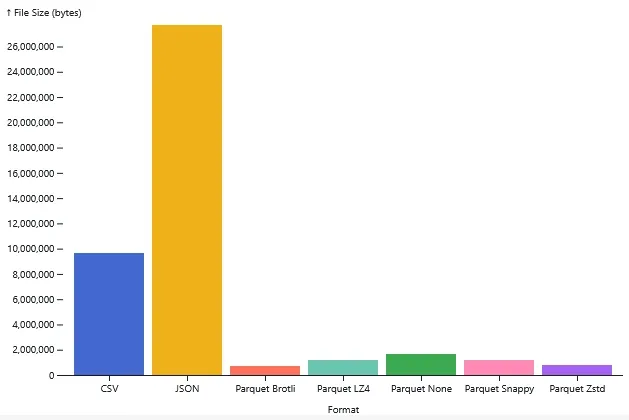
Adding standard compression algorithms like Snappy, LZ4, and Zstd barely impacted write speeds. They all finished in about 0.16 seconds, which is virtually the same as uncompressed. Zstd managed to compress the file down to a tiny 800 KB. That’s a 97% reduction in size compared to the JSON file, with almost no penalty on write performance.
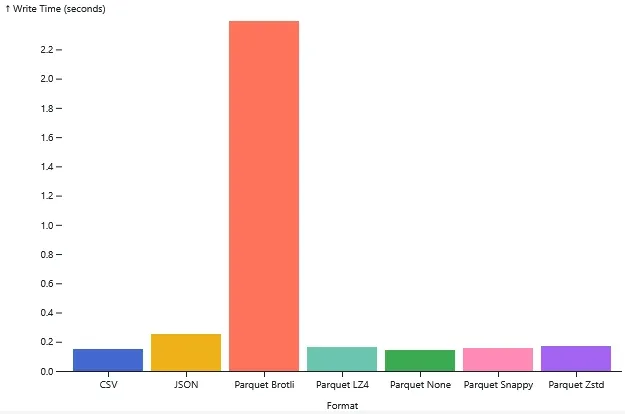
The only outlier was Brotli. While it won the file size competition by compressing the data down to 720 KB, the cost was steep. The write time was nearly 2.4 seconds. Unless you are archiving cold data and are desperate to save every last bit of disk space, that massive write time probably isn’t worth it.
Round 2: Query Performance
When it came to querying, CSV and JSON hovered around 0.1 seconds. That’s not bad, but pretty slow for a database given the size. Parquet, on the other hand, was instantaneous. Most queries completed faster than Python could clock them.
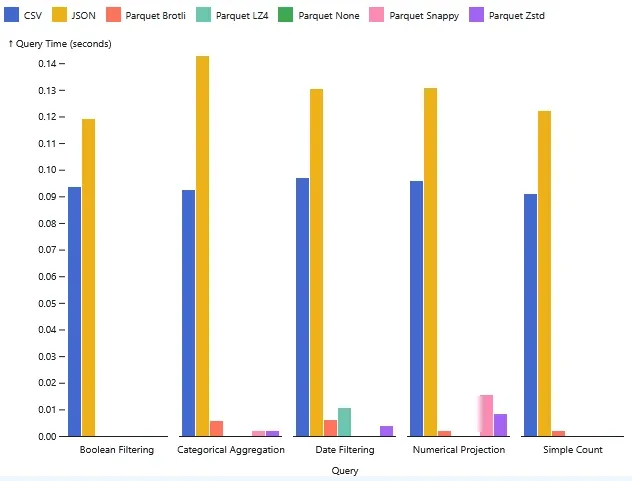
The secret is columnar storage. If I run a query on the score column, the CSV
reader has to scan every single row, parsing commas to find the right value.
Parquet just grabs the specific column data I asked for and ignores the rest.
Surprisingly, compression didn’t slow things down much. I thought Zstd or Snappy might lag due to decompression overhead, but they were just as fast as uncompressed Parquet. The efficiency of reading smaller files from disk clearly outweighs the minimal CPU cost required to unpack them.
What Should You Use?
For almost any analytical workload, Parquet is the answer. Snappy (the default in DuckDB) or Zstd compression hit the perfect balance between file size and speed. You get tiny files and instant reads without the write penalty. Unless you have a specific reason not to, make this your default.
If you need to share data with Excel or a human, CSV is fine. It’s universal, even if it’s slower. But avoid JSON for analytics; it’s too bloated. I’d only use it if the communication contract between two services requires it.
Smaller Files and Faster Queries
DuckDB is incredible, but don’t forget that the storage format you choose determines whether you get instant answers or wait around for I/O. Parquet with Snappy or Zstd gets you smaller files and faster queries essentially for free.
Cover photo by A Chosen Soul on Unsplash.